What Is an AI Word Camera? How Learning English From Photos Works
An AI word camera names the real objects around you and turns each one into a word card with pronunciation and translation, in about 2 seconds. Here is how it works, and why it beats memorising word lists.
PipWords: AI Word Camera
🌟 What is an AI word camera?
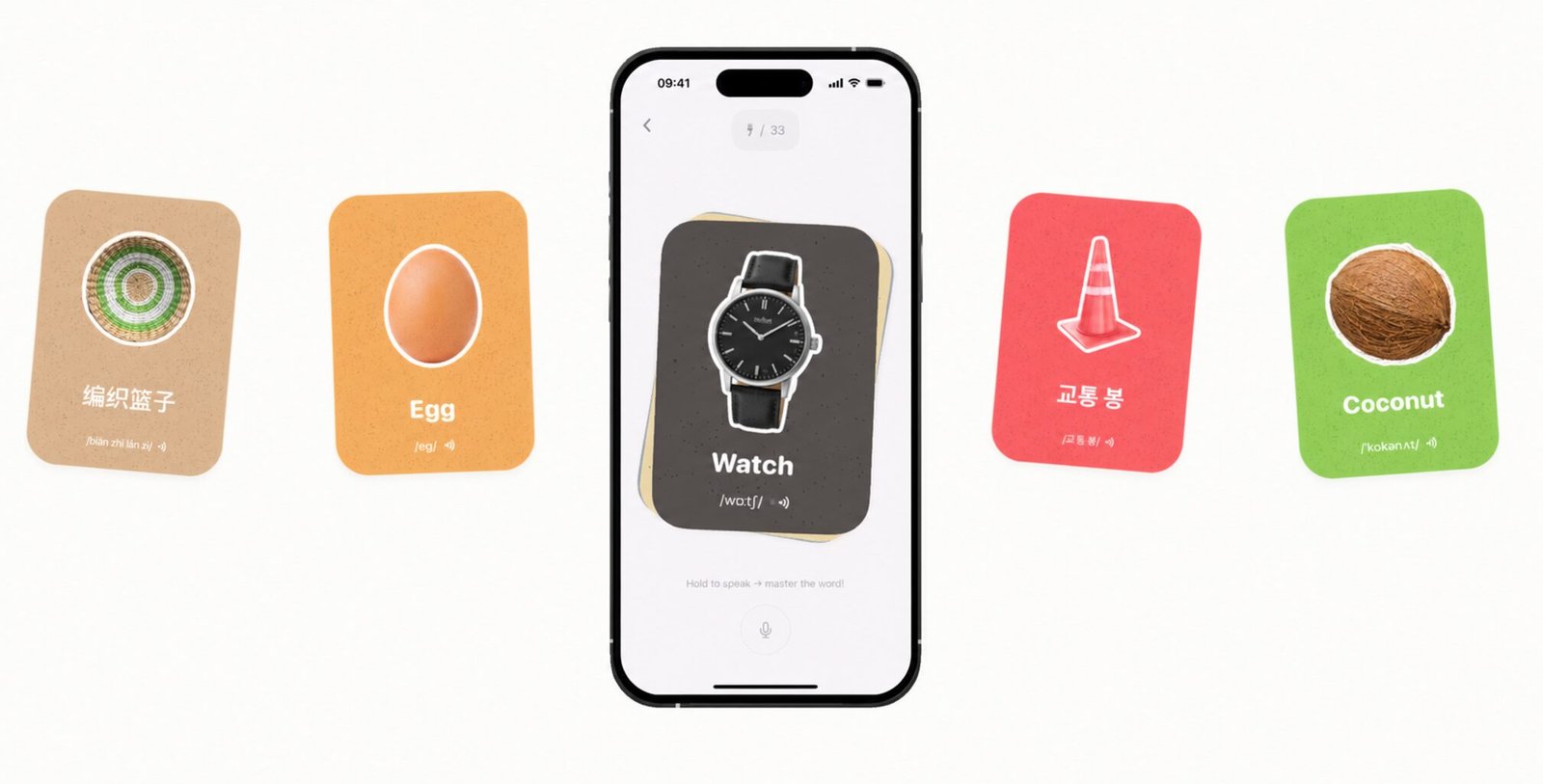
An AI word camera is a phone app that recognises real objects through your camera and instantly gives you the word for them in the language you are learning. You point, you snap, and a second later you have a card showing the object, the English word, how to pronounce it, and what it means in your own language. Nothing is typed. Nothing is looked up. The camera is the dictionary.
It is a genuinely new category. A translator turns text you already have into another language. A picture dictionary shows you a fixed set of someone else’s illustrations. An AI word camera works the other way round: it starts from your world (your kitchen, your desk, your street, your cat) and builds vocabulary out of it. The technology behind it is on-device or cloud object recognition combined with text-to-speech and translation, but the feeling is much simpler than that. It feels like the phone can suddenly name everything you can see.
The idea reached the mainstream in 2025, when Apple gave a Design Award to CapWords, a photo-vocabulary app. Since then several apps have taken the concept in different directions: some for adult learners, some, like PipWords, built as a full adventure for families. This guide explains the mechanics, the learning science, and how to judge whether one of these apps will actually work for you.
⚡ How an AI word camera works, step by step
The whole loop takes about two seconds in PipWords. Five things happen inside it:
- Step 1: You point at a real object.
A spoon, a bicycle, a teddy bear, the family cat. Anything physically in front of you counts: that is the whole point. - Step 2: The AI identifies what it is.
An object-recognition model decides that this shape is a banana and not a canoe. Good apps aim for speed here, because a slow wait breaks the magic and children stop playing. - Step 3: The object is cut out of the photo.
The subject is separated from its background and becomes a sticker. This is not only decoration: it removes your room from the picture, which matters if a child is photographing inside the family home. - Step 4: A word card is built.
The English word, the IPA phonetic spelling, an audio pronunciation you can tap, and the translation in your own language. In PipWords, translations are available in 17 languages, so an Arabic-speaking or Brazilian learner sees the meaning immediately, not just the English. - Step 5: The card is saved to a collection.
This last step is the one that decides whether an app teaches or just entertains. A saved card can come back tomorrow for review; a card that vanishes teaches nothing.
🧠 Why photos beat word lists
Learning words from your own photographs is not a gimmick. Three well-established ideas from memory research explain why it works so well:
Dual coding. A word stored with an image is stored twice: once as language, once as a picture. Two routes to the same memory means two chances to recall it. This is why picture dictionaries have always worked better than plain lists.
Personal relevance. A photo of your cat on your floor carries a memory that a stock photo of a generic cat never will. You do not just remember the word; you remember the afternoon you caught it. Word lists have no such hooks, which is exactly why they feel like work.
Spaced repetition. Every word fades unless it is met again at the right moment. Good apps schedule quiet reviews of your captured words days later, just before you would have forgotten them. The camera creates the memory; spaced review keeps it.
There is also a motivational effect that no study measures well: a child who is hunting objects is moving. They are choosing what to learn, running to the next room, deciding that the fridge magnet counts. That is a completely different mood from being handed a deck of 20 words to memorise.
🔍 Word camera vs translator vs picture dictionary
| Tool | Starts from | Teaches? | Best for |
|---|---|---|---|
| AI word camera | Real objects around you | Yes: saves and reviews your words | Building everyday vocabulary you actually use |
| Camera translator | Text on signs and menus | No: answers and forgets | Travel emergencies |
| Picture dictionary | A fixed set of illustrations | Partly: no personal link | Structured beginner topics |
| Flashcard app | Decks someone else wrote | Yes, but nothing is yours | Exams and long word lists |
The practical difference: a translator answers a question you already had. A word camera makes you curious about things you would never have thought to ask about, which is why users end up with hundreds of words they never planned to learn.
🎮 The part most apps forget: what happens after the snap
Snapping is the easy part. The hard problem in vocabulary learning has always been day four, when the novelty is gone and nobody opens the app. This is where AI word cameras differ most from each other, and it is the question worth asking before you install one: what makes my child come back tomorrow?
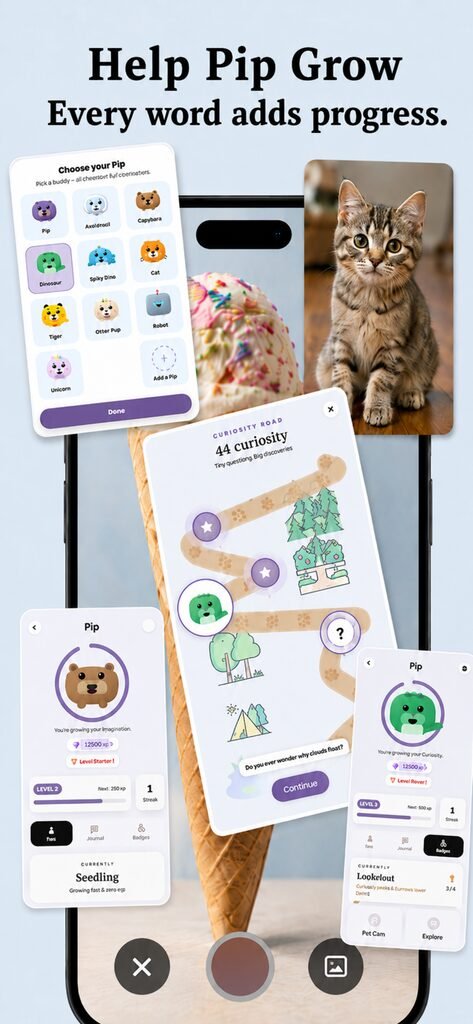
PipWords answers it with a game built on top of the camera. Captured words feed a daily quest trail of about three minutes. Words return as mini-games: eleven of them, each in its own little world. Progress moves a companion called Pip along a road through five lands, and at the gate of each land a boss blocks the way: Nibbles the Gate Snail on day one, Nova the Star Dragon at the very end. Each boss fight is, quietly, a vocabulary exam built from the words that learner personally caught. Winning grows Pip visibly and earns a medal; losing is gentle and the boss simply waits for a rematch.
Underneath the fun, spaced repetition decides which words appear in which game on which day. The learner experiences an adventure. The parent sees a growing museum of captured words and a review streak. Both are looking at the same data.
📱 Try an AI word camera in the next two minutes
PipWords is free to download on iPhone and Android. New users get a welcome offer for a limited time. There are no ads and no data selling, and when you share a word card only the cutout sticker leaves your phone, never the original photo of your home.
Comparing your options first? Read CapWords alternatives: 5 apps that turn photos into English words. Teaching a child at home? Start with the 7-day word hunt plan.
Conclusion
An AI word camera turns the room you are sitting in into a vocabulary course. The recognition is the trick; the memory system behind it is what makes the words stay. When you compare apps, look past the snap and ask what happens on day four: the answer to that question is the whole product.
❓ FAQ: AI word cameras
Q: What is an AI word camera?
A: A phone app that recognises real objects through the camera and turns each one into a word card with the word, pronunciation and translation. PipWords does this in about 2 seconds per object.
Q: How is it different from Google Translate’s camera?
A: Translate reads text you point at and gives an answer you forget. A word camera names physical objects and keeps each one as a saved card that comes back for review.
Q: Does it work offline?
A: Recognition quality and offline support vary by app. PipWords is built for a fast connected snap of about 2 seconds; saved cards and reviews remain available in your collection.
Q: Is an AI word camera good for children?
A: It suits children particularly well, because they choose what to photograph and stay physically active while learning. Look for an app with no ads and a real review system rather than only a camera.
Q: What happens to the photos of my house?
A: In PipWords the object is cut out of the picture, and only that cutout sticker is used or shared: the original photo and its background never leave the card. Ask this question of any camera app you install.
Q: Which languages can I learn from?
A: PipWords teaches English and shows meanings in 17 translation languages, with the app interface itself in 12 languages including Arabic with full right-to-left layout, Spanish and Portuguese.
Q: Can adults use it, or is it only for kids?
A: Adults use it too: the vocabulary of a real kitchen or workshop is exactly what textbooks skip. The game layer is designed to be playful without being childish.
Q: Is PipWords free?
A: Yes, PipWords is free to download on iPhone and Android, and new users get a welcome offer for a limited time.
🧑💻 About the Author
PipWords: the AI word camera
Written by the maker of PipWords, an independent app studio run by a parent-developer. PipWords was built after watching a child lose interest in flashcard apps within a week: the camera came first, then the quest road, the bosses and the spaced review that keeps caught words alive. The app runs on iPhone and Android, in 12 interface languages with translations in 17, with no ads and no data selling.
Questions or feedback: support@pipwords.site. More guides on the PipWords home page.