Best English Learning Apps for Kids: An Honest Comparison
Four apps that actually work, what each one really teaches, the ages they suit, and which is free. Written by an app maker who will tell you when a competitor fits your child better.
Written by the maker of PipWords: disclosure below
🌟 The short answer
For under-6s learning letters and sounds, Khan Academy Kids and Duolingo ABC are excellent and completely free. For a broad play-based curriculum for ages 2–8, Lingokids is the strongest paid option. For building real English vocabulary from the world around a child, and for children who lose interest after a week, PipWords uses the phone camera and a game to keep them coming back.
Most “best apps” lists rank apps that do completely different jobs, which is why they are so unhelpful. Teaching a five-year-old to sound out letters is not the same task as helping an eight-year-old learn 500 useful nouns, and no single app is best at both. This comparison sorts them by what they actually teach, then tells you which to pick for your situation.
Disclosure: this article is published by PipWords, one of the four apps below. We have been careful to describe the others accurately and to say plainly where they are the better choice, including the two that are free. Prices and features change, so check the current store listing before you subscribe to anything.
📊 Quick comparison
| App | What it really teaches | Best age | Cost | Best for |
|---|---|---|---|---|
| Khan Academy Kids | Early literacy, phonics, maths, social-emotional skills | 2–8 | Free, no ads | Best free all-rounder for young children |
| Duolingo ABC | Letters, sounds, tracing, early reading | 3–7 | Free | Learning to read; phonics practice |
| Lingokids | Play-based English curriculum plus wider topics | 2–8 | Limited free tier; paid plan (check current price) | A structured curriculum with songs and characters |
| PipWords | Real-world vocabulary from your own objects, with review | 5–12, and adults | Free to download; welcome offer for new users | Vocabulary that sticks, and children who quit other apps |
1️⃣ Khan Academy Kids: the best free option
Khan Academy Kids is genuinely free, with no advertising and no subscription: unusual enough in this category to be worth saying twice. It covers early reading and phonics, maths, and social-emotional learning through stories and activities, with a friendly cast of animal characters guiding young children through a structured path.
Choose it if: your child is under about eight, you want breadth beyond English, and you do not want to pay anything. For most families with a preschooler this should be the first app installed.
Its limits: it is built for children who already speak English learning to read it, rather than for children learning English as a second language. There is no translation into your home language, and vocabulary is taught through its own illustrations rather than your child’s real surroundings.
2️⃣ Duolingo ABC: for learning to read
Duolingo ABC is free and does one thing very well: it takes a child from letters to reading. Short game-like sessions have children trace letters, blend sounds into words, and read simple stories. The pacing is gentle and the lessons are properly bite-sized.
Choose it if: the goal is literacy (recognising letters, decoding words, beginning to read independently) for a child roughly three to seven.
Its limits: reading is not the same as vocabulary. A child can decode “elephant” perfectly and still not know what it means, and Duolingo ABC is not designed to build a large stock of words or to support a second-language learner with translations. It is also a separate product from the main Duolingo app, which suits older children and adults.
3️⃣ Lingokids: the play-based curriculum
Lingokids is polished and genuinely charming: animated characters, songs and mini-games covering English alongside wider topics such as emotions, habits and science. For children aged roughly two to eight who get bored by repetitive lesson formats, the variety is its real strength.
Choose it if: you want a ready-made curriculum with a clear path, you have a young child, and you are willing to pay for it.
Its limits: the free tier is tightly capped, a small number of activities per day, so in practice this is a paid app. Check the current subscription price in the store, since it has changed over time. As with the others, the content is the publisher’s world rather than your child’s own home.
4️⃣ PipWords: for building vocabulary from your child’s own world
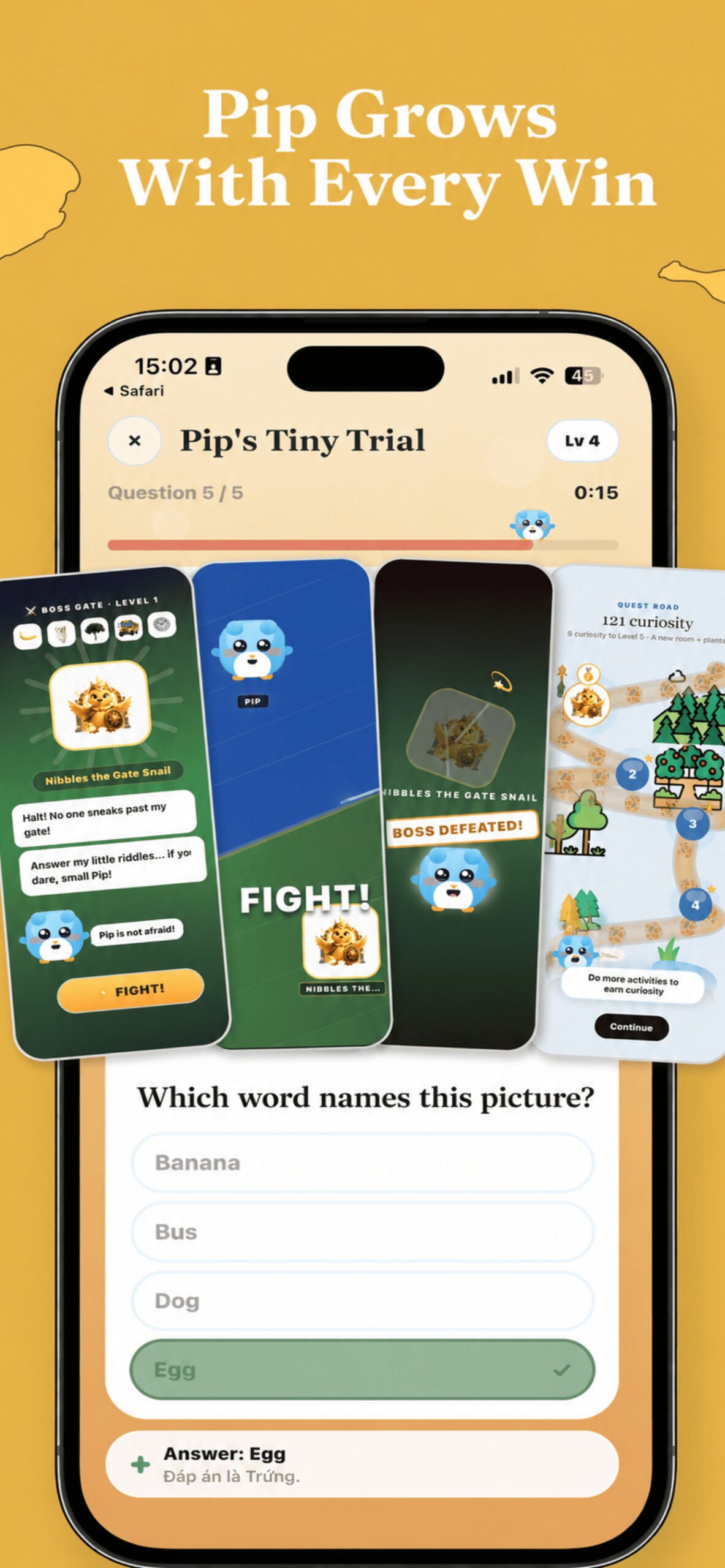
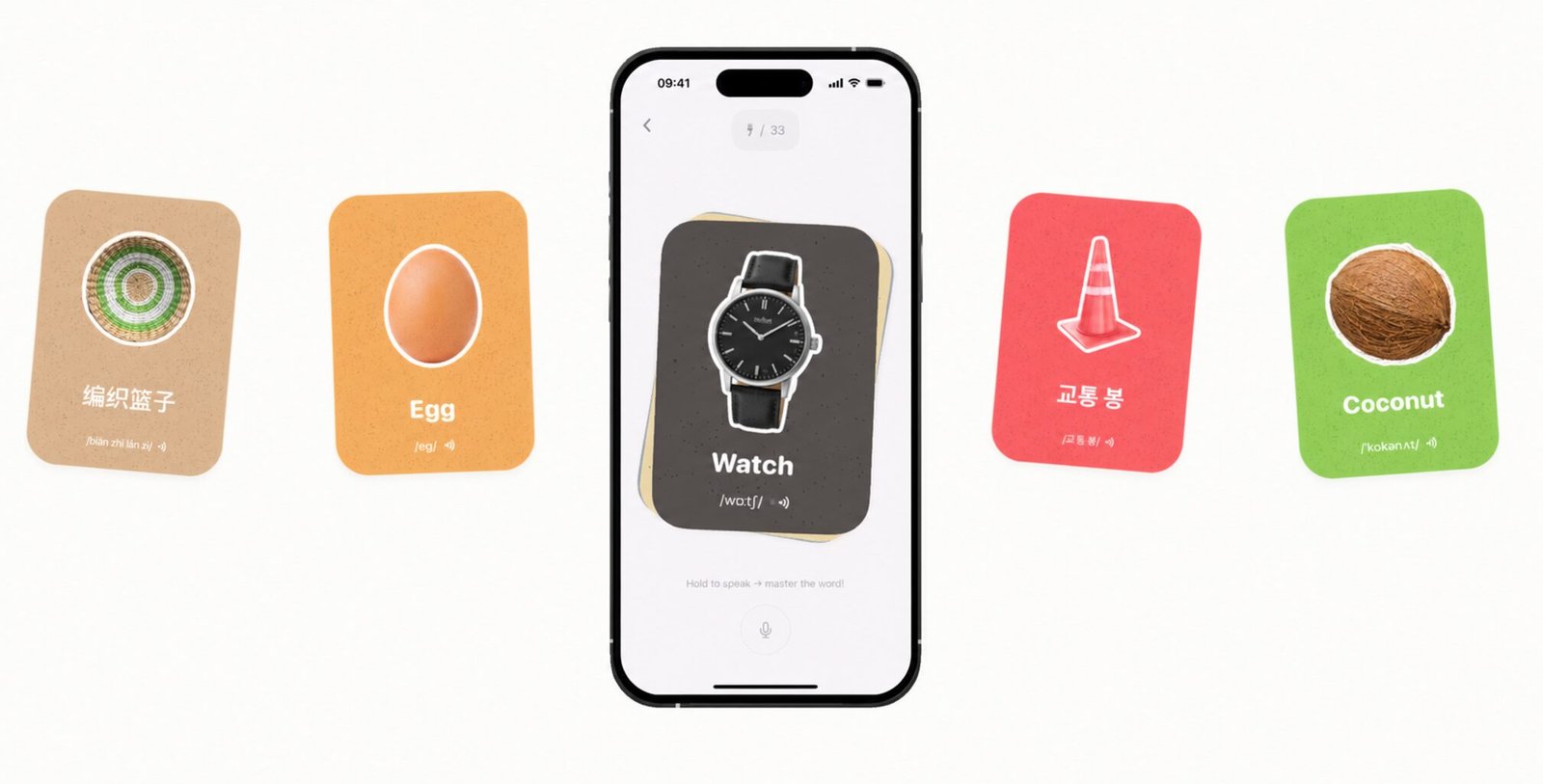
PipWords takes the opposite approach to everything above. Instead of teaching from a fixed set of illustrations, the child points the phone camera at a real object (their dinosaur, the kettle, the cat) and in about 2 seconds it becomes a word card with a cut-out photo of that object, the English word, IPA pronunciation, audio and a translation in one of 17 languages.
The second half is the part that answers the real parental question: will they still be using it next Thursday? Captured words feed a three-minute daily quest trail, return inside eleven mini-games, and are finally tested by a boss guarding the gate to each new land: Nibbles the Gate Snail on day one, Nova the Star Dragon at the end of the road. Every boss fight is a vocabulary exam built from that child’s own words, wrapped in a fight with medals and confetti. Losing is gentle; the boss simply waits for a rematch.
Choose it if: your child already knows some letters and needs words; you want translations into Arabic, Spanish, Portuguese or another home language; you are on Android as well as iPhone; or previous apps were abandoned after a week.
Its limits: PipWords does not teach phonics or how to read, for a four-year-old who does not yet know letters, start with Khan Academy Kids or Duolingo ABC and come back later. It also needs an internet connection to name an object, and it teaches English only.
🎯 Choose in 30 seconds
- Child under 6, want free → Khan Academy Kids
- Learning to read and sound out letters → Duolingo ABC
- Want a full curriculum with songs and characters → Lingokids
- Needs vocabulary, or has quit every other app → PipWords
- English is not your home language → PipWords or Lingokids; the two free apps assume English at home
Two apps is a sensible maximum. Beyond that, no single one gets used often enough to matter, and daily use beats variety every time.
🧠 What actually matters when judging any kids’ English app
Ignore feature lists and judge on four things instead:
- Does it bring words back? An app that presents new content endlessly teaches far less than one that reviews old content on a schedule. Ask whether it uses spaced repetition: this is why children forget.
- Does it ask, or only show? Recognition is easy and fades; being asked to produce a word is what makes it stick.
- Does the session end? Apps with no natural stopping point create arguments. Three to ten minutes with a clear ending is ideal.
- Ads and data. Prefer no advertising at all. Check what an app does with the camera and microphone before handing it to a child.
Conclusion
There is no single best English app for children: there is a best one for your child’s age and for the specific gap you are filling. Start free with Khan Academy Kids or Duolingo ABC if letters are the challenge. Move to vocabulary once reading has started, and pick whichever app your child actually opens without being asked. That last test matters more than any feature comparison.
Related: how many English words a child should know · the 7-day word hunt plan · photo vocabulary apps compared
❓ FAQ: English apps for kids
Q: What is the best English learning app for kids?
A: For under-6s, Khan Academy Kids: it is free, has no ads and covers reading and more. For learning to read, Duolingo ABC. For a paid curriculum for ages 2–8, Lingokids. For building real vocabulary from a child’s own surroundings, PipWords.
Q: Which app helps kids improve their vocabulary?
A: Choose an app that teaches words from the child’s own surroundings and brings each word back for review, because new words stick through repetition, not one-off lessons. PipWords is built for this: your child photographs real objects, hears each word with its pronunciation and meets it again in short games. Khan Academy Kids and Lingokids cover broader early learning, and Duolingo ABC focuses on reading.
Q: Are there genuinely free English apps for children?
A: Yes. Khan Academy Kids and Duolingo ABC are free with no subscription. PipWords is free to download, and new users get a welcome offer. Lingokids has a very limited free tier and is effectively a paid app.
Q: Which app is best if we do not speak English at home?
A: Choose one that shows meanings in your language. PipWords translates into 17 languages, including Arabic with right-to-left support, Spanish and Portuguese. Khan Academy Kids and Duolingo ABC assume an English-speaking household.
Q: What age should a child start an English app?
A: Around three or four for letters and sounds, and around five upwards for vocabulary building, once a child can name objects in their own language. Short daily sessions matter far more than starting early.
Q: How much screen time is reasonable?
A: Ten minutes of focused practice beats an hour of drifting. Prefer apps with a clear ending, a finished quest or a completed lesson, rather than an endless feed, so stopping is not a fight.
Q: My child gets bored of English apps after a week. What helps?
A: Boredom usually means the content is not personal. Apps built on your child’s own photos and objects, or with a progression they care about such as a character to grow, survive far longer than fixed lesson paths.
Q: Can an app replace English lessons or a tutor?
A: No. Apps are excellent for vocabulary, review and daily habit, but conversation practice with a person is what builds fluency. Use both if you can.
Q: Should I install several apps at once?
A: No. Two at most, ideally covering different jobs, such as one for reading and one for vocabulary. More than that and none of them gets used often enough to help.
🧑💻 About the Author
PipWords: the AI word camera
Published by the maker of PipWords, an independent studio run by a parent-developer. We name competitors’ strengths, including two apps that are free, because a family that installs the wrong app for their situation gives up on English apps altogether. Details were checked against current store listings and public comparisons in August 2026; features and prices change, so verify before subscribing.
Corrections welcome: support@pipwords.site.